


ELive-Chill&Stream
3.2114.00 Reviews
App Specs
- Version
- 2.0.0
- Updated On
- License
- Free
- Downloads
- 5,000,000+
- Developer
- Joywave Dev Team
- Categories
- Lifestyle
- Platform
- Android
Screenshots

 Analysis by AppCompare
I tend to judge a social streaming app by a simple question: does it make watching feel welcoming, and does going live feel approachable rather than like a production? ELive-Chill&Stream aims to do both, bringing live broadcasts and ways to connect into one lifestyle app. I would think of it as a place to browse and join conversations, not as a guaranteed route to building an audience or a replacement for every social platform.
What the free download does—and does not—tell you
The app is free to download, which makes trying it a low-commitment decision. It also offers in-app purchases ranging from $0.99 to $99.99 per item, so “free” should not be read as a promise that every optional purchase is necessary, or that every part of the experience has the same value for every person. I’d start by using the free access and decide for myself whether any purchase fits a real need, rather than spending just because an option appears in the app.
That distinction matters especially for a social app: a paid item is worthwhile only if it improves something I actually use. Before buying, I’d check the item’s description and price in the app, consider whether I expect to return regularly, and set a personal spending limit. If I only want to browse a few broadcasts now and then, paying may add little to my experience. If I become a regular participant, I can reassess based on what the app offers at that point.
Where the value comes from
For me, the appeal is the combination of watching live content and having a path to participate. A stream can turn a spare ten minutes into a small window onto somebody else’s hobby, while comments make it possible to respond instead of simply scrolling past. That can be a more social way to spend a break than watching a prerecorded clip, provided I enjoy the live format and accept that the timing and topic are not fully under my control.
Going live also gives the app a different kind of value for someone who wants to share a pastime without first putting together a polished video. A casual chat, a music practice session or a cooking demonstration can work as a reason to start a broadcast. I would treat the first session as a low-pressure test: choose one subject, make sure I have enough time to interact, and see whether being live feels comfortable before worrying about attracting an audience.
Navigating the Interface
When I first opened ELive-Chill&Stream, I was greeted by a sleek and modern interface that was as inviting as a cozy café on a rainy day. Everything is laid out intuitively, making it super easy to navigate. There’s a menu bar at the bottom with all the essentials: Home, Explore, Stream, Messages, and Profile. Simple, right? It’s designed so even your tech-challenged buddy can find their way around.
Exploring Features
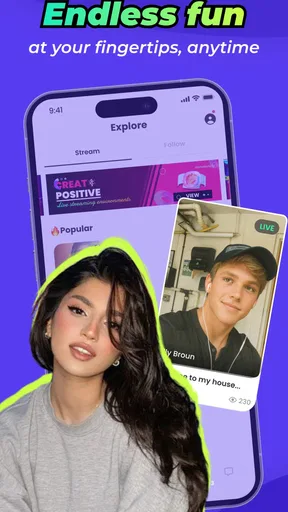
One of the coolest features is the Explore section. It’s like diving into a treasure chest of content. You can discover live streams from around the globe, covering everything from gamers showcasing their skills to chefs whipping up delicious dishes. The diversity here is pretty impressive. I spent hours just hopping from one stream to another, and it felt like traveling without leaving my couch.
Worth Reading Before You Choose

EA SPORTS FC Mobile 26 Is a Bigger Football Game, but It Takes Time

Flipboard Shows What News Apps Must Do Beyond the Feed

Switching to Android Auto Means Rethinking Your Driving Routine

Google Calendar Makes a Crowded Week Easier to Manage

Ludo King Makes the Most of the Minutes Between Plans

Baby Panda World Brings Quick Play to Modern Phones, but Its Game Library Feels Busy
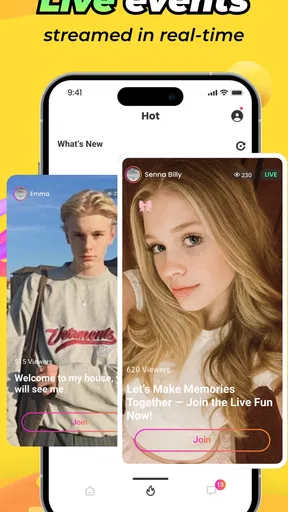
The streaming feature is what makes this app stand out. Setting up your own stream is a breeze. Whether you want to share a live jam session or just chat with your followers, the app’s got you covered. The quality is top-notch, with minimal lag, which is crucial if you’re trying to build an audience. And don’t worry about being a newbie; the app provides handy tips to get you started.
Chill Time
Now, let's talk about the "Chill" aspect. If you’re not in the mood to stream, you can simply kick back and enjoy what others are broadcasting. The app’s community is vibrant and active, which means there’s always something happening. You can interact in real-time with streamers through comments, which adds a layer of engagement that keeps things lively.
Another feature that caught my eye is the option to save your favorite streams. It's like building your own little library of awesome content that you can revisit anytime. Handy, right?
Making the live format work for you
Live viewing has a different rhythm from ordinary video feeds. Instead of expecting every visit to deliver a perfectly tailored clip, I’d use Explore with a small goal: find one topic I’m in the mood for, stay long enough to see whether the host and chat suit me, then move on if they don’t. This is a useful way to keep browsing from turning into aimless hopping. A live room can be enjoyable even when I only listen for a few minutes, but the format rewards patience more than a short, edited video does.
Saving a favorite is most useful when I treat it as a reminder, not as a promise that I can catch up on everything later. I’d save streams or creators I genuinely want to revisit and keep the list selective. That makes it easier to return to familiar interests without turning saved items into another endless queue. If I mainly want a searchable archive of finished videos, a conventional video platform may be a better fit than a service centered on live interaction.
A realistic way to use it during the day
Imagine I have a quiet half-hour after dinner and want company while I unwind. I could open Explore, look for a broadcast related to music or cooking, and spend a few minutes observing the room before commenting. If the conversation feels comfortable, I can join in; if not, I can switch streams or simply watch. On another evening, I might use the Stream area for a short informal session about a hobby. This is a more sensible first test than planning a long broadcast or expecting strangers to gather immediately.
That scenario also highlights a practical trade-off: live content asks me to be present at the time it happens. If my schedule is unpredictable, I may get more consistent value from on-demand videos or podcasts, where I can pause and resume whenever I like. ELive’s draw is the possibility of a shared moment, not maximum control over when or how I consume content.
Chill Time
Now, let's talk about the "Chill" aspect. If you’re not in the mood to stream, you can simply kick back and enjoy what others are broadcasting. The app’s community is vibrant and active, which means there’s always something happening. You can interact in real-time with streamers through comments, which adds a layer of engagement that keeps things lively.
Another feature that caught my eye is the option to save your favorite streams. It's like building your own little library of awesome content that you can revisit anytime. Handy, right?
Connecting with the Community
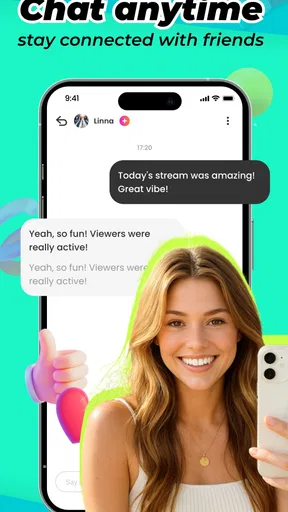
One thing that sets ELive-Chill&Stream apart is its community vibe. You’re not just a passive viewer; you can actively participate and connect with others. The messaging feature allows for private conversations, and joining groups based on your interests is just a tap away. I found myself chatting with fellow music lovers and even joined a cooking group where we swapped recipes. It’s a great way to make friends and share experiences.
Keeping social features comfortable
Because viewing, comments, private messages and groups all invite different levels of interaction, I’d ease into them separately. A sensible first visit is to browse and see what kinds of conversations feel right; commenting is a smaller step than starting a private chat or sharing personal details. I’d keep messages focused on the shared interest and be thoughtful about what I reveal to people I have just met. That is useful advice for any community app, but especially one where live conversation can feel immediate and personal.
The Teen content rating is also worth considering before recommending the app to a younger family member. A rating is a cue to make an informed choice, not a substitute for checking whether a particular community or interaction feels suitable. For parents, I’d suggest discussing boundaries around live chats and private messages rather than assuming that a friendly topic automatically makes every interaction appropriate.
How it compares with familiar alternatives
Compared with short-form social video apps, ELive is more appealing when I want to watch something as it unfolds and have a chance to respond in the moment. Compared with a dedicated live-streaming service, its lifestyle positioning and social tools make the experience feel broader than simply tuning in to a broadcast. The trade-off is that people looking for a specific creator ecosystem, highly curated on-demand library or a narrowly focused hobby community may prefer an alternative built around that single purpose.
It also isn’t the best choice for every kind of conversation. If my goal is a private catch-up with people I already know, a standard messaging or video-calling app is usually more direct. If I want background entertainment without comments or the unpredictability of live rooms, recorded shows and podcasts are easier to fit around chores or travel. I see ELive as strongest when discovery and real-time participation are part of the fun, rather than as a universal substitute for those services.
Performance and Reliability
Now, you might be wondering about the app's performance. I tested it on both Android and iOS, and it runs smoothly on both platforms. The developers seem to have put in a lot of effort to ensure a seamless experience, which is evident in the app’s stability. I didn’t experience any crashes or major bugs, which is always a plus.
The app also doesn’t hog your phone’s resources, so you can run it in the background while multitasking. Battery drain is minimal, which is a relief for those long streaming sessions. It also adapts well to different network speeds, automatically adjusting the quality to provide the best viewing experience possible without constant buffering.
Choosing your first steps carefully
If I were starting fresh, I’d first browse without committing to a broadcast, then save only a couple of streams that match my interests. After that, I’d try a comment or join a relevant group and see whether the community side adds something I value. This sequence lets me judge the viewing experience, discovery and social layer separately, rather than deciding based on one unusually good or poor stream.
For anyone planning to go live, I’d keep the first session simple and make the topic clear so viewers know what they are joining. A short, focused broadcast is easier to manage than trying to entertain continuously. Live streaming also depends on having a suitable connection and a setting where I’m comfortable being seen or heard; if that sounds stressful, there’s no reason to force it. The app can still make sense as a place to watch and participate at my own pace.
Who is most likely to enjoy it
I’d recommend giving it a try if you like discovering people through live hobbies, enjoy commenting while something is happening, or want an approachable place to test casual broadcasting. It may also suit someone who values both public streams and smaller community conversations in one app. The free download makes that initial trial easier, while the purchase range is a reason to stay deliberate rather than assume spending is part of getting started.
I’d skip it, or at least keep expectations modest, if I need a tightly organized library, dislike unpredictable live discussions, or want private communication without a wider social setting. It is also a weaker fit if I’m looking for guaranteed reach as a creator: an easy start is not the same as an established audience. A creator who needs advanced production control or a specific professional workflow should compare dedicated tools before committing to this as their main setup.
Audience and expectations
The app has reached over one million installs, but popularity alone doesn’t tell me whether I’ll find the right people or broadcasts for my interests. Its average rating is three out of five from around 4,700 ratings, with 84 written reviews. I read that as a reason to approach with measured expectations: give the app a fair trial, but judge its community and day-to-day usefulness for myself instead of treating install numbers as a promise of quality.
ELive is developed by Efun Team, is free to download, and its current version is 1.8.0. It was released on February 16, 2025, and requires Android 6.0 or later; the app is also available on iOS. These details make it easier to check whether it suits your device and whether you are comfortable trying a relatively recent social app. Its Teen rating is another reason to think about the kind of live interaction that is appropriate for you or anyone you recommend it to.
Final Thoughts
So, is ELive-Chill&Stream worth downloading? Absolutely! Whether you're a content creator looking to share your world or someone who just loves watching live streams, this app has something for everyone. It's user-friendly, packed with features, and backed by a vibrant community. Plus, it’s free to download, so you’ve got nothing to lose by giving it a try.
Ready to dive into a world of endless streaming and chill vibes? Download ELive-Chill&Stream and start exploring today. Who knows, you might just find your new favorite hangout spot right on your phone!
My practical verdict
My recommendation is a cautious try rather than an automatic yes. The combination of browsing, live participation, messaging and groups gives the app a clear reason to exist, especially if you like meeting people around shared interests. Its free access makes exploration easy, but the average rating and optional purchases make it sensible to assess the experience before investing time or money. I’d use it for casual discovery and low-pressure streams, then keep it only if the conversations and content are genuinely worth returning to.
In short, I’d choose ELive when I want a social, live-first way to spend a break, and choose a recorded-video or messaging app when I need more control, privacy or predictable content. Start with a small session, explore one interest, and make any spending decision only after you know what you personally get from it. That feels like the fairest way to decide whether this particular app belongs in your routine.
Pros
- User-friendly interface for easy navigation.
- High-quality streaming with minimal lag.
- Diverse content categories available.
- Interactive chat features enhance engagement.
- Supports multiple languages for global reach.
Cons
- Occasional ads may interrupt viewing.
- Requires stable internet for smooth streaming.
- Limited offline content availability.
- Some features locked behind paywall.
- Battery consumption can be high during use.
FAQs for ELive-Chill&Stream
What is ELive-Chill&Stream and how does it work?
ELive-Chill&Stream is a social streaming app that allows users to broadcast live videos and interact with their audience in real-time. Users can create their own streams or join others, participate in live chats, and share content across social media platforms. It’s a great way to connect with friends, meet new people, and share experiences.
Is ELive-Chill&Stream free to use?
Yes, ELive-Chill&Stream is free to download and use. However, it offers in-app purchases and a premium subscription model that provides additional features such as ad-free streaming, exclusive content, and enhanced interaction tools. Users can enjoy basic features at no cost, but may opt for premium services for a richer experience.
What are the key features of ELive-Chill&Stream?
ELive-Chill&Stream offers a variety of features including live video broadcasting, interactive chat rooms, user profiles, and social media sharing. Users can also customize their streaming experience with filters and effects, receive virtual gifts, and participate in community events. The app aims to enhance user engagement through diverse interaction tools.
How secure is ELive-Chill&Stream in terms of privacy and data protection?
ELive-Chill&Stream prioritizes user privacy and data protection. It employs encryption to secure personal information and has privacy settings that allow users to control who can view their streams. The app also adheres to GDPR compliance standards, ensuring that users' data is handled responsibly and transparently.
What devices and operating systems are compatible with ELive-Chill&Stream?
ELive-Chill&Stream is compatible with both Android and iOS devices. It requires Android version 5.0 or higher and iOS version 10.0 or later. The app is optimized for smartphones and tablets, providing a seamless user experience across different screen sizes and device types. Regular updates ensure compatibility with the latest OS versions.


